Pinsetter: The Ultimate Guide to Mixing and Matching Hand-Lettered Fonts
In the vast world of digital typography, finding the perfect font often feels like a compromise. You might find a font with a charming personality but poor legibility, or a clean geometric sans-serif that feels too sterile for your creative project. However, a specific category of fonts—hand-lettered typefaces—offers a unique warmth and authenticity that digital tools often struggle to replicate. Among these, the Pinsetter font family stands out as a masterclass in design flexibility and creative utility. It is not just a single typeface; it is a comprehensive system designed to give designers, crafters, and hobbyists the freedom to build custom typographic compositions with ease.
What Exactly is Pinsetter?
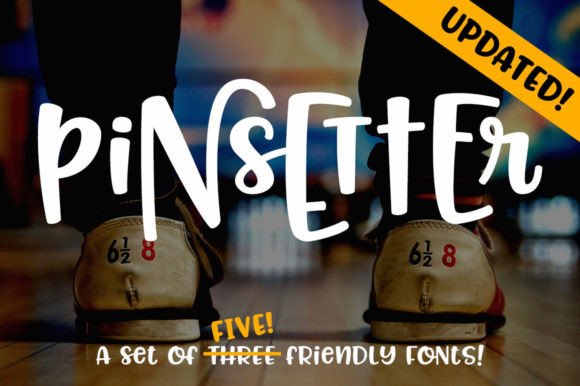
At its core, Pinsetter is a set of fun, hand-lettered fonts. However, describing it merely as "hand-lettered" undersells its ingenuity. The defining characteristic of Pinsetter is its modular nature. Unlike standard fonts where every letter sits on the same baseline and shares the same height, Pinsetter consists of three distinct alphabets—the Littles, the Middles, and the Talls—that are designed to interact with one another.
Imagine a family of letters that can snuggle together. The Littles are lowercase, the Middles are standard uppercase height, and the Talls are extended ascenders and descenders designed specifically to cradle the smaller letters. This structure allows users to create dynamic, vertical stacking compositions that mimic the look of custom hand-lettering seen on chalkboards, wedding invitations, and artisan packaging.
The Anatomy of the Alphabet Family
To understand the utility of Pinsetter, it helps to break down its components:
- The Littles: These function as the lowercase letters. They are the foundation of the font family, offering a casual, baseline script style.
- The Middles: These are the uppercase equivalents. They stand alone perfectly well, but they also have a specific x-height that allows them to pair harmoniously with the Littles.
- The Talls: These are the showstoppers. The Talls feature exaggerated ascenders (the parts of letters like 'b' or 'd' that go up) and descenders (the parts of 'g' or 'y' that go down). They are engineered to wrap around the Littles, creating a cozy, overlapping effect.
The Power of Modularity: Why Mix and Match?
The primary appeal of the Pinsetter system is its ability to mix and match. In traditional typography, mixing fonts can be risky; mismatched baselines or conflicting styles can make text look messy. Pinsetter eliminates this risk by pre-designing the compatibility.
Whether you are designing a logo for a coffee shop, creating a header for a scrapbook page, or designing a t-shirt, the ability to layer text adds depth and visual interest. For example, you might want the word "Fresh" to appear small and lowercase, with the word "BAKED" towering over it in a Tall format. Pinsetter allows you to do this intuitively.
Practical Applications for Designers
The practical relevance of Pinsetter extends across various creative industries:
- Graphic Design & Branding: Logos often require a bespoke feel. Using the Talls to frame a word written in Littles can create a unique, hand-crafted logo mark without hiring a professional hand-letterer.
- Crafting and DIY Projects: For users of Cricut or Silhouette machines, Pinsetter is invaluable. It allows for "knockout" or "layered" text designs where letters physically overlap, creating a professional sticker or vinyl decal.
- Digital Content Creation: Social media graphics benefit from high-contrast typography. Using the Pinsetter Complete set allows bloggers and influencers to create eye-catching headers that stop the scroll.
Navigating the Technical Side: OpenType Features
Typography software has evolved, and modern applications (like Adobe Illustrator, Photoshop, or Affinity Designer) utilize OpenType features. This is where Pinsetter truly shines for advanced users.
The Pinsetter Complete file is a single font file that contains all three alphabets (Littles, Middles, and Talls). Instead of switching between three different font files in your dropdown menu, you keep "Pinsetter Complete" selected and use the software's OpenType panel to toggle between styles.
- Default Setting: When you type, the default output is the Littles.
- Swash Button: By highlighting specific letters and activating the "Swash" feature, you can instantly swap those letters for the Middles alphabet.
- Stylistic Alternates: Activating the "Stylistic Alternates" button transforms the selected text into the Talls.
This workflow is incredibly efficient. It keeps your workspace organized and allows you to experiment with different combinations quickly without cluttering your font menu.
Accessibility for All Software Users
A common misunderstanding about advanced fonts is that they require expensive or complex software to function. The creator of Pinsetter addressed this by ensuring total compatibility across the board.
If you do not have access to OpenType alternates (which is common in basic word processors or older design software), Pinsetter is still fully functional. The font family has been broken out into three separate files:
- Pinsetter Littles
- Pinsetter Middles
- Pinsetter Talls
This means that no matter what software you are using—from Microsoft Word to basic online editors—you can simply select the specific font file from your dropdown menu to access that style. Each set includes its own full set of uppercase, lowercase, numbers, and over 200 accented characters, ensuring that the font is usable for international languages and complex typographic needs.
Evolution of the Family: The 2018 Update
Good design tools evolve over time to meet the needs of their users. In March 2018, the Pinsetter family received a significant update that added even more versatility. Two new files were introduced:
- Pinsetter Littles Hollow: This is an outline version of the Littles alphabet. It allows designers to create a transparent, "hollow" text effect. Crucially, it is designed to stack perfectly on top of the standard Pinsetter Littles. This creates a "knockout" effect where you can see the color of the background through the text, or layer a different color behind the solid version.
- Pinsetter Little Chunk: This variation offers a bolder, more robust version of the Littles, providing more weight and presence for headlines or logos that need a stronger visual anchor.
These additions demonstrate the font's adaptability. The "Hollow" feature, in particular, is a favorite among t-shirt designers who want to create distressed or vintage looks without complex layering techniques.
Clarifying Common Assumptions
It is important to clarify that while Pinsetter looks like casual handwriting, it is a highly structured digital asset. One common assumption is that "hand-lettered" fonts are always messy or difficult to read. Pinsetter balances personality with legibility. The characters are spaced (kerned) correctly to ensure readability in sentences, not just headlines.
Furthermore, the "mix and match" capability does not mean the letters are random. The baselines, x-heights, and curves are mathematically calculated to ensure that a 'Tall' letter 'h' perfectly cradles a 'Little' letter 'e'. This calculated harmony is what separates a professional font system from a simple collection of doodles.
Conclusion
Pinsetter represents a bridge between the organic charm of hand-lettering and the precision of digital design. By offering a modular system of Littles, Middles, and Talls, it empowers users to create complex, layered typographic art that feels personal and unique. Whether you are using the advanced OpenType features in the Complete file or simply toggling between the separate files in a basic editor, Pinsetter provides the tools to make your text come alive. It is a testament to how thoughtful font design can simplify the creative process and expand the possibilities of visual communication.