Swipe: A Bold Retro Font for Your Creative Projects
Capturing the Spirit of the Seventies
If you have ever looked at a vintage movie poster or an old vinyl record cover and felt a rush of nostalgia, you understand the magnetic pull of retro design. There is something timeless about the aesthetics of the past, particularly the bold and groovy era of the seventies. However, finding a font that captures that vintage vibe without looking dated or difficult to read can be a challenge. Enter Swipe, a typeface designed to bridge the gap between historical flair and modern usability.
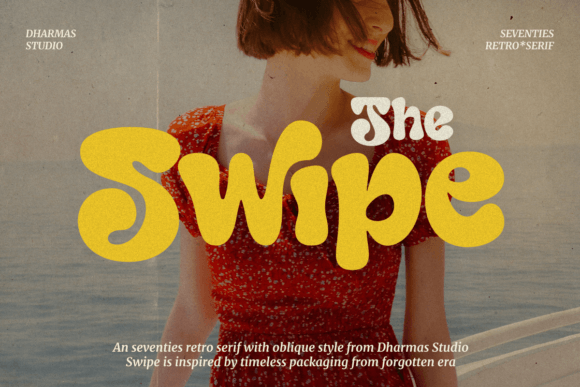
Swipe is not just another font; it is a design tool built to evoke a specific feeling. It combines a retro aesthetic with a fun, approachable attitude. The defining feature of this typeface is its smooth curves and soft bold strokes. Unlike rigid, geometric fonts, Swipe flows with a gentle rhythm. It avoids the sharp edges that can make text feel aggressive, opting instead for a rounded, welcoming appearance. This design choice makes it perfect for projects that need to feel friendly, energetic, and distinctly nostalgic.
Understanding the Font Styles
When you download Swipe, you are getting more than just a single static file. The font comes equipped with two distinct styles: Regular and Oblique. This versatility is crucial for designers who need to create hierarchy within their work.
The Regular style is your workhorse. It has that classic, upright stance that commands attention in headlines and logotypes. It is perfect for the main title of a poster or the name of a brand. The Oblique style, on the other hand, adds a sense of motion and slant. It is ideal for subheadings, quotes, or call-to-action text where you want to imply speed or excitement. By pairing these two styles, you can create a complete visual identity that looks cohesive and professional.
Where Can You Use Swipe?
One of the most common questions regarding display fonts is about their versatility. Because Swipe has a "soft bold" weight rather than a heavy, blocky weight, it remains legible across a surprisingly wide range of applications. It is a super-versatile typeface that fits naturally into both digital and physical mediums.
Here are some practical ways to incorporate Swipe into your creative workflow:
- Logotypes and Branding: If you are starting a small business with a vintage or casual vibe, Swipe offers a memorable logo foundation. It works exceptionally well for coffee shops, retro clothing lines, or lifestyle blogs.
- Apparel Design: The smooth curves of Swipe make it a favorite for T-shirt graphics. It prints well on fabric because the letters are distinct and do not bleed together, even at smaller sizes.
- Print Materials: Think about posters, flyers, and book covers. Swipe grabs the eye immediately. It is particularly effective for event flyers, music festival promotions, or book covers in the fiction or lifestyle genres.
- Packaging: If you are designing packaging for a product, the font sets the tone on the shelf. Swipe suggests that the product inside is fun, high-quality, and perhaps a little bit playful.
- Digital Content: For bloggers and social media managers, using Swipe for YouTube thumbnails or Instagram quotes can increase engagement. It stands out in a crowded feed because of its unique, retro character.
A Technical Advantage: PUA Encoding
For many casual users and even some professionals, accessing special characters in a font can be frustrating. You might see a beautiful swash or a decorative glyph in the preview images, but struggle to find it in your design software. Swipe solves this problem by being fully PUA encoded.
PUA stands for Private Use Areas. In simple terms, this means that every single glyph, swash, and stylistic alternate included in the font file is accessible. You do not need advanced design software like Adobe Illustrator to use the special features. Whether you are using a basic text editor, a simple design app, or a professional suite, you can copy and paste the special characters with ease. This ensures that you can unlock the full creative potential of Swipe without technical headaches.
Who is Swipe For?
The appeal of this font spans a wide audience. It is designed for adults aged 20 to 50, but its utility is universal.
Beginners and Hobbyists: If you are new to design, Swipe is forgiving. Its soft edges mean it is hard to make it look "ugly." It naturally enhances a layout.
Professionals and Entrepreneurs: For those building a brand, Swipe offers a distinct personality. It helps businesses stand out from the sea of standard sans-serifs used by corporate competitors.
Educators and Marketers: If you need to capture attention quickly—whether in a classroom presentation or a marketing email—the bold, clear nature of Swipe makes it an excellent choice for headings and key takeaways.
Important Considerations
While Swipe is incredibly versatile, it is important to use it correctly to get the best results. As a display font with a distinct retro personality, it is best used for headings, titles, and short bursts of text.
You should generally avoid using Swipe for long paragraphs of body copy. Its stylistic nature is designed to be admired in short doses; using it for 12-point body text might reduce readability. Instead, pair it with a clean, simple sans-serif or serif font for your main paragraphs. Let Swipe do the heavy lifting for your headlines, and use a neutral font for the details.
Adding Nostalgia to Your Next Project
Design trends often come full circle, and the current resurgence of retro aesthetics shows no signs of slowing down. Swipe allows you to participate in this trend with a tool that is polished, functional, and easy to use. Whether you are designing a wedding invitation with a vintage twist, a logo for a new startup, or a poster for a local event, Swipe provides that perfect blend of nostalgia and modern design sensibility. It is a font that invites your audience to look closer and smile.