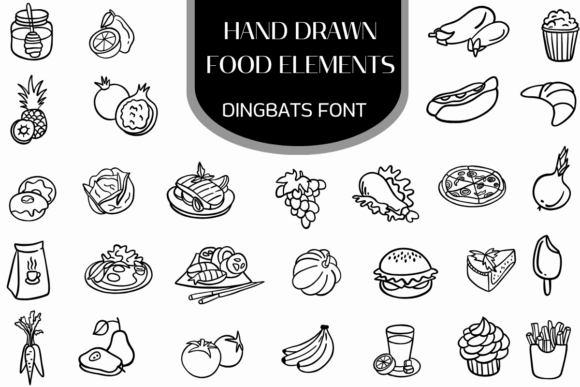
Hand Drawn Food Elements: A Complete Dingbats Font Guide
For designers and creators in the culinary space, visual storytelling is not just about layout; it is about flavor. When standard stock photography feels too sterile or generic icons lack personality, finding the right balance between professionalism and warmth becomes a challenge. This is where specialized graphic resources bridge the gap, offering tools that feel human and authentic. Hand Drawn Food Elements represents a unique solution in this space, functioning as a dingbats font that transforms your keyboard into a library of culinary illustrations. Rather than searching through clipart folders or drawing from scratch, you can access a comprehensive collection of food art simply by typing a letter.
Understanding the Dingbats Font Concept
At its core, Hand Drawn Food Elements is a typeface file where standard alphanumeric characters are replaced with vector graphics. This approach offers significant workflow advantages over traditional image files. When you install this font on your operating system, it integrates seamlessly into any software that supports text, including Adobe Illustrator, InDesign, Photoshop, Canva, Microsoft Word, and even PowerPoint.
The primary benefit of this structure is editability. Unlike a PNG or JPG file, a dingbats font vector scales infinitely without losing resolution. Whether you are designing a massive banner for a farmers' market stall or a tiny icon for a mobile app, the lines remain crisp. Furthermore, because the graphics are rendered as text, you can change the color of the illustrations instantly using the standard font color tool in your design software. This eliminates the need to open a separate image editor just to adjust the hue of a tomato or a coffee cup.
The Aesthetic: Monoline and Doodle Soul
The visual style of Hand Drawn Food Elements is defined by its clean, organic monoline outlines. It avoids heavy fills or complex shading, opting instead for a "casual doodle" aesthetic. This style is incredibly versatile because it communicates approachability without sacrificing legibility. The illustrations feel hand-sculpted, offering a human touch that digital vector packs often lack.
This specific aesthetic—clean lines with a slight organic wobble—pairs exceptionally well with modern typography. If you are working with sans-serif fonts like Helvetica or Montserrat, the doodle style softens the corporate edge. If you are pairing it with a serif font like Garamond, the illustrations add a contemporary twist to a classic layout. This ability to mesh flawlessly with various typographic styles makes Hand Drawn Food Elements a robust tool for visual identity projects.
Practical Applications for Creators and Businesses
The utility of a comprehensive food illustration library extends across numerous industries. While the obvious use case is restaurant branding, the flexibility of the font allows for creative applications in marketing, publishing, and education.
Restaurant Menu Design and Decor
For restaurant owners and menu designers, Hand Drawn Food Elements serves as a powerful decorative tool. Instead of cluttering a menu with heavy photography, which can be expensive to shoot and difficult to format, you can use these illustrations to categorize sections or highlight signature dishes. For example, a small burger icon next to the "Mains" section header or a coffee cup near the "Beverages" list creates a visual hierarchy that guides the reader's eye. The "handcrafted charm" of the font implies that the food is made with care, reinforcing a brand message of quality before the customer even takes a bite.
Branding for Local Markets and Artisanal Goods
Small business owners, particularly those in the artisanal food sector, often struggle to find branding assets that feel authentic. Hand Drawn Food Elements includes staples like fresh grocery produce—pineapples, tomatoes, and grapes—which are ideal for farmers' market signage, jam jar labels, or grocery tote bags. Because the style is consistent across the entire font, mixing and matching different food items creates a cohesive look. A juice bar, for instance, could use the fruit illustrations to build a pattern for their wallpaper or menu board, ensuring a unified visual identity.
Digital Content and Social Media
In the fast-paced world of social media marketing, distinctiveness is key. Food bloggers and culinary influencers can use Hand Drawn Food Elements to create engaging Instagram Stories, Pinterest pins, or YouTube thumbnails. The illustrations work well as stickers or accent graphics overlaid on food photography. Because they are vector-based, they maintain a clean, professional look even when scaled up for high-definition screens. This allows content creators to maintain a consistent "cozy culinary" vibe across their digital presence without spending hours on graphic design.
Expanding the Creative Toolkit
The library within Hand Drawn Food Elements is designed to be comprehensive, covering a wide range of gastronomy categories. This breadth is crucial for designers who work with diverse clients.
- Savory Staples: The collection includes comfort foods like pizza, burgers, sushi, and grilled steaks. These are essential for casual dining establishments, fast-food branding, or food delivery service apps.
- Bakery and Desserts: Icons representing pastries, cakes, and sweets are perfect for bakeries, wedding planners, or recipe book illustrations.
- Beverages: Coffee and drink illustrations are ubiquitous in design needs, suitable for cafe menus, morning routine blog posts, or beverage packaging.
By having these categories available in a single font file, Hand Drawn Food Elements simplifies the decision-making process. You do not need to purchase separate icon packs for meat, fruit, and drinks. This consolidation saves time and ensures stylistic consistency across different projects.
Ensuring Professional Approachability
One of the subtle challenges in design is balancing "fun" with "professional." A cartoonish style can sometimes make a brand look amateurish, while overly corporate graphics can feel cold. Hand Drawn Food Elements navigates this by focusing on clean, monoline outlines. The drawings are recognizable and charming, but they are not cluttered with unnecessary details.
This "professional approachability" is particularly valuable for educational materials or family-oriented brands. For example, a nutritionist creating a guide for children might use these illustrations to teach food groups. The friendly, doodle-like nature of the graphics makes the content less intimidating and more engaging for the audience. Similarly, a community cookbook publisher can use the font to add decorative flourishes to chapter headings, giving the publication a high-end, artisanal feel without the cost of commissioning custom artwork.
Limitations and Considerations
While Hand Drawn Food Elements is a versatile tool, it is important to understand its nature as a dingbats font to use it effectively. Because the images are mapped to keyboard keys, you cannot easily search for a specific icon by name within the software (e.g., searching for "burger" will not highlight the icon). Users typically need to refer to a reference guide or "key map" provided by the font creator to know which letter corresponds to which illustration.
Additionally, because the style is a "clean monoline," it may not suit projects that require photorealism or heavy, grunge-textured aesthetics. If a brand's identity relies on dark, gritty textures or 3D rendering, a simple line-art font might feel out of place. However, for the vast majority of culinary, lifestyle, and branding projects that value clarity and charm, Hand Drawn Food Elements provides an efficient and stylistically appropriate solution.
Streamlining Workflow Efficiency
For freelancers and agencies, efficiency is directly tied to profitability. Using Hand Drawn Food Elements can significantly reduce the time spent sourcing and formatting graphics. Instead of downloading a vector pack, unzipping files, and placing images into the layout, a designer can simply type a character and resize it. This workflow integration is seamless. The font allows for rapid prototyping; a designer can quickly populate a menu draft with various food icons to test layout balance, then change the color or size with a single click. This speed supports a more fluid creative process, allowing more time for the conceptual aspects of design rather than the mechanical assembly of assets.
Conclusion
In a visual landscape crowded with generic stock art, Hand Drawn Food Elements offers a specific, high-quality solution for culinary design needs. By combining the accessibility of a font file with the aesthetic quality of hand-sculpted illustration, it empowers creators to produce professional, approachable, and cohesive visual identities. Whether you are building a menu for a new bistro, designing a label for homemade jam, or creating educational materials about nutrition, this dingbats font provides the essential ingredients for effective visual communication.