Chowag: Integrating a Bold Display Typeface into Your Design Workflow
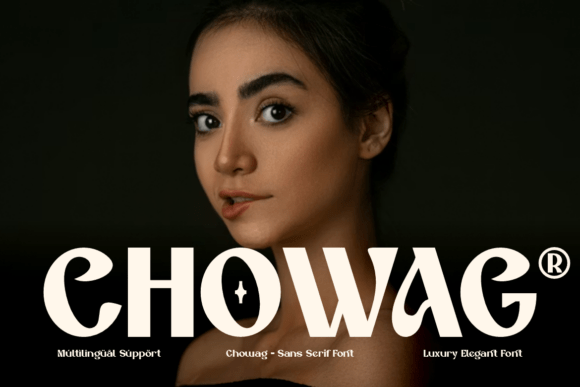
In the landscape of digital design and brand identity, typography is rarely a background detail; it is a structural element that dictates tone and readability. When selecting typefaces, the decision often boils down to balancing aesthetic impact with technical utility. Chowag enters this space as a bold, authentic display typeface designed for versatility. It is not merely a decorative asset but a functional tool intended to serve a variety of design needs, from commercial branding to digital content creation. Understanding how to integrate a typeface like Chowag into a professional workflow requires a look at its characteristics, its file formats, and the practical steps needed to ensure consistency across different platforms.
The Role of Display Typography in Modern Projects
Display typefaces are the workhorses of headlines, logos, and signage. Unlike text fonts designed for long-form reading, display fonts are optimized for immediate visual impact. Chowag fits into this category by offering a bold presence that commands attention without relying on overly complex ornamentation. For professionals ranging from marketers to educators, a typeface with this kind of weight and authenticity serves a specific purpose: it anchors the visual hierarchy. In a practical workflow, this means Chowag is likely the first element a viewer reads on a poster, a slide deck, or a website header. Its role is to establish the mood—whether that is authoritative, playful, or edgy—before the viewer engages with the smaller, secondary text.
Technical Preparation and Asset Management
Before a designer can implement Chowag into a project, proper asset management is required. The package includes both .OTF (OpenType Font) and .TTF (TrueType Font) versions. While these formats are similar, they have distinct advantages depending on the operating system and software being used. The .TTF format is the standard for compatibility across older systems and basic software, while the .OTF format often includes advanced typographic features, such as ligatures or alternate character sets, that are accessible in professional design suites like Adobe Illustrator or InDesign.
A practical implementation tip for freelancers and small business owners is to establish a centralized font library on their primary device or cloud storage. Before installing, it is wise to preview the font files to ensure they render correctly. Once installed, Chowag becomes available in the font dropdown menus of standard design software. This preparation step prevents workflow interruptions later in the project timeline.
Strategic Application: Before, During, and After Production
The utility of Chowag extends across the lifecycle of a project. Its application can be categorized into three distinct phases of a standard creative workflow.
Phase 1: Conceptualization and Branding
In the early stages of a project, typography helps define the brand voice. For entrepreneurs and startup founders, selecting Chowag during the mood board phase allows for an exploration of how its bold, authentic character aligns with the brand’s values. If the goal is to project stability and confidence, the heavy weight of the font supports that narrative. It interacts with color palettes and imagery to create a cohesive visual identity. Using it at this stage ensures that the "voice" of the design is consistent from the very first draft.
Phase 2: Execution and Layout
During the execution phase, efficiency is key. Chowag supports this through its multilingual capabilities. For publishers and bloggers working with diverse audiences, the ability to switch between languages without changing the typeface streamlines the layout process. It eliminates the need to hunt for a secondary font that matches the aesthetic of the primary one just to accommodate a different character set.
Furthermore, the font’s design allows for scalability. Whether the project involves a large-format print or a small mobile screen, the legibility of the characters remains intact. This is particularly important for marketers creating assets that must be responsive across different devices. Integrating Chowag into CSS stylesheets or design templates at this stage ensures that the execution matches the initial concept.
Phase 3: Quality Control and Delivery
After the design is complete, the focus shifts to quality control. A common pitfall in design workflows is font substitution, which occurs when a recipient’s computer does not have the specific font installed, causing the layout to break. By providing the client with the specific .OTF or .TTF files included in the package, or by outlining the font in vector software for logos, designers can prevent this issue. This step is crucial for maintaining the integrity of the design upon delivery.
Compatibility and Integration with Other Tools
No font exists in a vacuum. The effectiveness of Chowag depends on how well it pairs with other typographic elements. A practical workflow observation is that bold display fonts often pair best with neutral, lighter sans-serif or serif fonts for body text. This contrast creates a visual rhythm that is easy for the reader to follow.
For productivity-minded users, the integration of Chowag into project management tools—such as creating headers for Trello boards, Notion pages, or internal documents—can improve the scannability of information. While not every tool allows for custom font uploads, using Chowag in exported PDFs or internal branding materials helps maintain a professional standard across all documentation.
Long-Term Use and Consistency
Consistency is the hallmark of professional work. Once Chowag is selected as part of a brand or project toolkit, it should be documented in a style guide. This guide should specify where and how the font is to be used—for example, exclusively for H1 headers and logos, or for call-to-action buttons. By codifying these rules, teams ensure that the authentic character of the font is preserved over time, regardless of who is working on the project.
Ultimately, Chowag offers a blend of aesthetic boldness and technical flexibility. It is a tool designed to fit into the practical realities of modern design work, offering a reliable solution for those looking to make a strong visual statement. By understanding its formats, planning its application, and managing its integration, users can leverage this typeface to enhance the quality and consistency of their output.