Integrating the Bunting Font into Your Professional Design Workflow
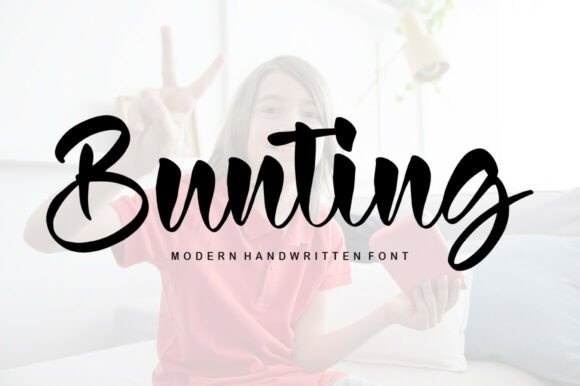
In the realm of digital typography, the selection of a typeface is rarely merely an aesthetic choice; it is a functional decision that impacts user perception, brand consistency, and the overall success of a project. Bunting, a delicate, elegant, and flowing handwritten font, represents a specific category of design assets that requires thoughtful integration. Because it possesses beautiful and well-balanced characters, it matches a wide pool of designs, ranging from wedding stationery to sophisticated marketing materials. However, to leverage its potential effectively, professionals must understand how to implement this font within the constraints of modern workflows, ensuring compatibility, readability, and strategic impact.
Understanding the Functional Role of Bunting
Before placing Bunting into a design file, it is essential to define its role within the broader visual hierarchy. As a script font, it functions best as a display typeface—used for headlines, pull quotes, or accent text—rather than body copy. Its "handwritten" quality introduces a human element to digital interfaces, which can be a powerful tool for brands aiming to appear approachable yet professional. When analyzing the font's characteristics, you will notice that its legibility holds up well at larger sizes, a common pitfall for many cursive scripts that become muddled when scaled down.
The integration process begins with an assessment of the project’s tone. If the goal is to convey warmth, creativity, or luxury, Bunting is a strong candidate. However, it must be paired with a complementary sans-serif or serif font to handle the heavy lifting of long-form text. This pairing strategy is crucial for maintaining a balanced layout. For instance, combining the fluidity of Bunting with the rigid structure of a geometric sans-serif creates a visual contrast that guides the reader’s eye naturally from the header to the content body.
Pre-Project Planning and Asset Preparation
Effective implementation starts long before the design phase. During the planning stage of a project—whether it is a website launch, a product packaging redesign, or a social media campaign—typography must be selected based on technical constraints. You need to verify the licensing of Bunting to ensure it covers your specific use case, such as web embedding, desktop use, or app integration.
Once the license is secured, the preparation phase involves creating a typography style guide. This document acts as the source of truth for all stakeholders. It should specify exactly where and how Bunting will be used. For example:
- Primary Usage: Hero section headlines and call-to-action buttons.
- Restricted Usage: Navigation menus, legal disclaimers, or paragraphs longer than two sentences.
- Pairing Rules: Always pair with "Open Sans" or "Lato" in a 70/30 ratio (70% sans-serif, 30% Bunting).
- Color Application: Define specific hex codes for the font to ensure contrast compliance against various backgrounds.
This preparation prevents bottlenecks later in the process. If you are working with a team, providing the font files (TTF, OTF, and WOFF2 formats) alongside the style guide ensures that developers and other designers can install the asset immediately, maintaining consistency across the entire production pipeline.
Workflow Integration: The Design and Development Phase
During the active execution of a task, the interaction between Bunting and your design tools (such as Figma, Adobe Illustrator, or Canva) becomes central. The font’s "flowing" nature means that letter spacing (tracking) and line height (leading) require manual adjustment. Automated settings often result in overlapping ascenders and descenders, which can ruin the elegance of the script. A practical tip is to increase the line height by at least 20-30% more than you would for standard block text to allow the loops and tails of the letters to breathe.
For web developers, implementing Bunting involves more than just adding a CSS rule. Performance is a key consideration. Handwritten fonts can be heavy, potentially slowing down page load times if not optimized. To mitigate this, use the font-display: swap; property to ensure text remains visible during the font loading phase. Additionally, consider subsetting the font if you are only using it for a specific tagline; this removes unused characters from the file size, improving site speed and SEO performance.
Compatibility with Digital Platforms
The usability of Bunting extends beyond static design. If you are using this font for email marketing or presentation decks, compatibility becomes a primary concern. Not all email clients render custom web fonts. In such cases, the workflow must include a fallback strategy. You should define a safe, standard script font (like Cursive) in your CSS or email builder settings so that if Bunting fails to load, the layout does not break.
Furthermore, when applying Bunting to social media assets, consider how the font renders on mobile devices. The "delicate" strokes of the font might disappear if the background image is too busy. A practical implementation step is to always place a semi-transparent overlay or a solid shape behind the text to ensure the "well-balanced characters" remain the focal point of the graphic.
Quality Control and Consistency
As you move toward the final stages of a project, quality control is vital. Review all instances of Bunting to ensure the aesthetic holds up across different contexts. This involves checking for visual jarring—situations where the handwritten font clashes with the imagery or the tone of the surrounding text. Because Bunting is elegant, it pairs poorly with rough, grunge textures or overly technical data visualizations. It shines best alongside clean lines, whitespace, and high-quality photography.
Consistency is the hallmark of professional work. If you use Bunting for the header of a landing page, use it for the headers of subsequent pages as well. Do not switch between Bunting and other script fonts randomly. This creates a disjointed user experience and undermines trust. By adhering to the style guide established in the planning phase, you ensure that the font serves its purpose as a cohesive brand element rather than a distraction.
Long-Term Use and Adaptability
Finally, consider the longevity of the design system you are building. Trends in typography change, but a classic, well-balanced script like Bunting often retains its appeal longer than trendy, distorted fonts. To future-proof your workflow, organize your assets so that Bunting is easily accessible and version-controlled. If the font receives updates from the designer, ensure you propagate those changes through your design system to maintain security and stability.
By treating Bunting not just as a visual decoration but as a functional tool within a structured process, you can harness its elegance to elevate your projects. The key lies in preparation, technical optimization, and a disciplined approach to visual hierarchy. When these elements align, the font becomes a seamless part of your professional toolkit, enhancing communication and engaging your audience effectively.