USA Urban Art: Infuse Your Designs with Street-Smart Energy
When you need text that commands attention, whispers of raw city energy, and screams patriotism all at once, you need more than a standard font. You need a typeface with attitude. Enter USA Urban Art, a full-color OpenType-SVG display font that doesn't just sit on the page—it bursts off it. Modeled after modern graffiti art, this font captures the visceral thrill of street murals and combines it with a bold, patriotic colorway perfect for events that demand a high-energy visual punch.
What Exactly is USA Urban Art?
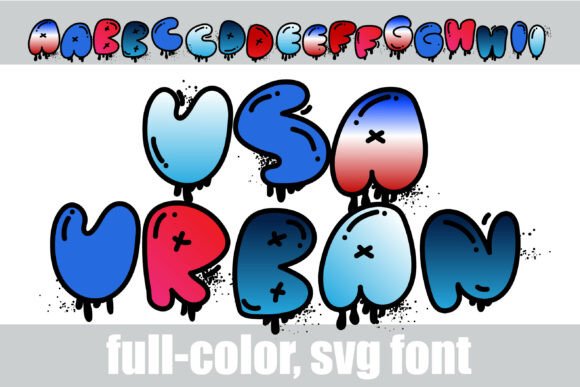
At its core, USA Urban Art is a specialized digital asset designed for maximum impact. Unlike traditional vector fonts, this is an OpenType-SVG font. This technology allows for bitmap-like graphics, meaning the letters can contain complex textures, gradients, and effects that standard fonts cannot achieve. You aren't just typing a letter 'A'; you are placing a pre-rendered, 3D, glossy, balloon-style character complete with realistic spray paint splatters and wet paint drips pooling off the base.
The visual signature of this font is distinct. It features extra-chunky, bulbous characters outlined in jet-black markers. The colorway is deeply patriotic, utilizing a beautiful gradient that transitions smoothly from cherry red to white to deep navy blue. It is a spectacular choice for specific, high-energy applications:
- Youth Summer Festivals: Capturing the energetic vibe of summer camps and music events.
- Patriotic Streetwear: Creating labels and apparel that feel authentic and edgy.
- Skatepark Event Flyers: Conveying movement and action instantly.
- Custom Sticker Sheets: Adding a professional, textured look without extra design work.
- Urban-Themed Apparel: Specifically for Fourth of July t-shirt printing where standard fonts fall flat.
Avoiding the "Flat Design" Trap with OpenType-SVG
One of the most common misunderstandings designers have when working with a font like USA Urban Art is treating it like a standard vector asset. Because it is an OpenType-SVG file, it behaves differently. A frequent mistake is attempting to use this font in software environments that do not support color fonts or SVG technology. If you try to load it in older versions of design software or basic text editors, you may see a blank box or a standard, un-styled character. This leads to frustration and wasted time.
The Better Approach: Before you commit to a project, verify your software supports OpenType-SVG. Adobe Photoshop (CC 2017+), Adobe Illustrator (CC 2018+), and Affinity Designer are safe bets. If you are a small business owner creating a quick flyer in a browser-based tool like Canva, check if they support color fonts; many free editors do not render the SVG data correctly, leaving you with a flat, monochrome silhouette. Always test your environment first to ensure the 3D glossy shine and the red-white-blue gradients render as intended.
Color Management and Contrast Issues
Because the colorway is baked into the font file, you cannot simply highlight the text and change the color to green or yellow. This is a major point of friction for beginners who assume they can recolor the font to match a specific brand palette. Another oversight involves background contrast. The font features deep navy blues and jet-black outlines. Placing this text on a dark background will cause the details to vanish, rendering the "street-smart" energy unreadable.
Practical Advice: Treat the font as a fixed graphic element rather than a malleable text tool. When selecting backgrounds, stick to high-contrast options—bright whites, light grays, or pale concrete textures work best. This ensures the intricate details, like the wet paint drips and the embedded street-art X accent markers, remain visible. If you need a different colorway for a specific project, it is often better to convert the text to outlines or a smart object and apply a color overlay, though this will sacrifice the original gradient details. For the authentic USA Urban Art look, embrace the red, white, and blue.
Scaling and Resolution: Keeping It Crisp
Another critical detail often overlooked is scaling. Because OpenType-SVG fonts utilize raster data (bitmap images) within the vector container, scaling them up drastically can result in pixelation. If you are designing a massive banner for a festival stage or a billboard, the "chunky" texture might start to look blurry if the original resolution isn't high enough.
How to Avoid Blurry Results: Check the font's native resolution. For large-format printing, you may need to use the font at a reasonable size and then upscale it carefully using software like Photoshop, ensuring your interpolation settings are set to preserve hard edges. Conversely, scaling the font too small can make the details—like the splatters and drips—look like messy noise. This font is designed for display purposes; do not try to use it for body copy or small sub-headings. It shines brightest when it has room to breathe.
Spacing and Layout Strategy
Given the "extra-chunky" and "bulbous" nature of the characters, kerning (the space between letters) is crucial. A common mistake is leaving the default tracking on. Because the letters are round and wide, they can appear to crash into one another, making words like "AMERICA" or "FREEDOM" look like a jumbled mess.
Better Typographic Choices: Take the time to manually adjust the tracking. Increasing the space between letters often helps the 3D shine lines and the balloon shapes stand out individually. Furthermore, because the font carries so much visual weight, use it sparingly. It is the typographic equivalent of a fireworks finale—effective as a headline, but exhausting as a paragraph. Pair it with a simple, clean sans-serif font for any supporting information to maintain a balanced, professional layout.
Pre-Flight Checklist for Your Project
Before you finalize your design using USA Urban Art, run through this quick evaluation to ensure you aren't making poor decisions that affect your presentation:
- Software Compatibility: Have you confirmed your editor supports SVG-OpenType?
- Background Check: Is your background light enough to contrast with the navy and black outlines?
- Size Appropriateness: Is the text large enough to show the spray paint details but not so large it looks pixelated?
- Spacing: Have you adjusted the kerning so the bulbous letters aren't overlapping?
- Context: Does the patriotic, street-art style fit the message? (e.g., it works for a skate jam, but perhaps not for a formal business report).
By respecting the technical requirements and the specific stylistic intent of USA Urban Art